
参考至AI以及https://www.aptly.info/tutorial/mirror/
经历了按 aptly help 尝试输命令,导入 archive gpg key,升级(update)对应的 ca-certificates,再mirror成功的历程
注意:我按直觉安装了 debian-ports-archive-key,尝试连接对应debian 密钥服务器,无果,然后在下载仓库时,似乎aptly又要求仓库的 release.gpg 也需要公钥,本来按直觉应该去找 debian 的密钥服务器,最后尝试了提示的命令里的 ubuntu 的密钥服务器,也成功了
注意2:trustedkey.gpg 这个只是 aptly 的默认密钥存储名称,没有什么特殊含义或作用
skp1238@Mint-Yilong15Pro:~$ aptly mirror create -architectures="riscv64" 2023-port https://snapshot.debian.org/archive/debian-ports/20230612T050707Z unstable
Looks like your keyring with trusted keys is empty. You might consider importing some keys.
If you're running Debian or Ubuntu, it's a good idea to import current archive keys by running:
gpg --no-default-keyring --keyring /usr/share/keyrings/debian-archive-keyring.gpg --export | gpg --no-default-keyring --keyring trustedkeys.gpg --import
(for Ubuntu, use /usr/share/keyrings/ubuntu-archive-keyring.gpg)
Downloading https://snapshot.debian.org/archive/debian-ports/20230612T050707Z/dists/unstable/InRelease...
Error downloading https://snapshot.debian.org/archive/debian-ports/20230612T050707Z/dists/unstable/InRelease: https://snapshot.debian.org/archive/debian-ports/20230612T050707Z/dists/unstable/InRelease: Get "https://snapshot.debian.org/archive/debian-ports/20230612T050707Z/dists/unstable/InRelease": EOF retrying...
Retrying 0 https://snapshot.debian.org/archive/debian-ports/20230612T050707Z/dists/unstable/InRelease...
Giving up on https://snapshot.debian.org/archive/debian-ports/20230612T050707Z/dists/unstable/InRelease...
Downloading https://snapshot.debian.org/archive/debian-ports/20230612T050707Z/dists/unstable/Release...
Following redirect to https://snapshot.debian.org/file/d37c0a21a47d33f4c5f9acb46f919b7f4413c6b8/Release...
Error downloading https://snapshot.debian.org/archive/debian-ports/20230612T050707Z/dists/unstable/Release: https://snapshot.debian.org/archive/debian-ports/20230612T050707Z/dists/unstable/Release: Get "https://snapshot.debian.org/file/d37c0a21a47d33f4c5f9acb46f919b7f4413c6b8/Release": EOF retrying...
Retrying 0 https://snapshot.debian.org/archive/debian-ports/20230612T050707Z/dists/unstable/Release...
Giving up on https://snapshot.debian.org/archive/debian-ports/20230612T050707Z/dists/unstable/Release...
ERROR: unable to fetch mirror: https://snapshot.debian.org/archive/debian-ports/20230612T050707Z/dists/unstable/Release: Get "https://snapshot.debian.org/file/d37c0a21a47d33f4c5f9acb46f919b7f4413c6b8/Release": EOF
skp1238@Mint-Yilong15Pro:~$ curl -I https://snapshot.debian.org
HTTP/1.1 200 Connection established
curl: (35) OpenSSL SSL_connect: SSL_ERROR_SYSCALL in connection to snapshot.debian.org:443

skp1238@Mint-Yilong15Pro:~$ apt install debian-ports-archive-keyring
正在读取软件包列表... 完成
正在分析软件包的依赖关系树... 完成
正在读取状态信息... 完成
下列【新】软件包将被安装:
debian-ports-archive-keyring
升级了 0 个软件包,新安装了 1 个软件包,要卸载 0 个软件包,有 106 个软件包未被升级。
需要下载 31.3 kB 的归档。
解压缩后会消耗 59.4 kB 的额外空间。
获取:1 http://mirrors.aliyun.com/ubuntu noble/universe amd64 debian-ports-archive-keyring all 2024.02.02 [31.3 kB]
已下载 31.3 kB,耗时 0秒 (114 kB/s)
正在选中未选择的软件包 debian-ports-archive-keyring。
(正在读取数据库 ... 系统当前共安装有 1014808 个文件和目录。)
准备解压 .../debian-ports-archive-keyring_2024.02.02_all.deb ...
正在解压 debian-ports-archive-keyring (2024.02.02) ...
正在设置 debian-ports-archive-keyring (2024.02.02) ...

skp1238@Mint-Yilong15Pro:~$ gpg --no-default-keyring --keyring /usr/share/keyrings/debian-ports-archive-keyring.gpg --export | gpg --no-default-keyring --keyring trustedkeys.gpg --import
gpg: 密钥 8D69674688B6CB36:公钥 “Debian Ports Archive Automatic Signing Key (2024) ftpmaster@ports-master.debian.org” 已导入
gpg: 密钥 3AF65F93D6FBC5B9:公钥 “Debian Ports Archive Automatic Signing Key (2025) ftpmaster@ports-master.debian.org” 已导入
gpg: 处理的总数:2
gpg: 已导入:2

skp1238@Mint-Yilong15Pro:~$ gpg --no-default-keyring --keyring trustedkeys.gpg --keyserver keyring.debian.org --recv-keys 8D69674688B6CB36 3AF65F93D6FBC5B9
gpg: 找不到有效的 OpenPGP 数据。
gpg: 处理的总数:0

skp1238@Mint-Yilong15Pro:~$ aptly mirror create -architectures="riscv64" 2023-port https://snapshot.debian.org/archive/debian-ports/20230612T050707Z unstable
Downloading https://snapshot.debian.org/archive/debian-ports/20230612T050707Z/dists/unstable/InRelease...
Following redirect to https://snapshot.debian.org/file/411e6e14940e44b0ee8ba67c020f2fe330a5ca59/InRelease...
Error downloading https://snapshot.debian.org/archive/debian-ports/20230612T050707Z/dists/unstable/InRelease: https://snapshot.debian.org/archive/debian-ports/20230612T050707Z/dists/unstable/InRelease: Get "https://snapshot.debian.org/file/411e6e14940e44b0ee8ba67c020f2fe330a5ca59/InRelease": EOF retrying...
Retrying 0 https://snapshot.debian.org/archive/debian-ports/20230612T050707Z/dists/unstable/InRelease...
Giving up on https://snapshot.debian.org/archive/debian-ports/20230612T050707Z/dists/unstable/InRelease...
Downloading https://snapshot.debian.org/archive/debian-ports/20230612T050707Z/dists/unstable/Release...
Following redirect to https://snapshot.debian.org/file/d37c0a21a47d33f4c5f9acb46f919b7f4413c6b8/Release...
Error downloading https://snapshot.debian.org/archive/debian-ports/20230612T050707Z/dists/unstable/Release: https://snapshot.debian.org/archive/debian-ports/20230612T050707Z/dists/unstable/Release: Get "https://snapshot.debian.org/file/d37c0a21a47d33f4c5f9acb46f919b7f4413c6b8/Release": EOF retrying...
Retrying 0 https://snapshot.debian.org/archive/debian-ports/20230612T050707Z/dists/unstable/Release...
Giving up on https://snapshot.debian.org/archive/debian-ports/20230612T050707Z/dists/unstable/Release...
ERROR: unable to fetch mirror: https://snapshot.debian.org/archive/debian-ports/20230612T050707Z/dists/unstable/Release: Get "https://snapshot.debian.org/file/d37c0a21a47d33f4c5f9acb46f919b7f4413c6b8/Release": EOF

skp1238@Mint-Yilong15Pro:~$ curl -I https://snapshot.debian.org
HTTP/1.1 200 Connection established
HTTP/2 200
server: Apache
x-content-type-options: nosniff
x-frame-options: sameorigin
referrer-policy: no-referrer
x-xss-protection: 1
permissions-policy: interest-cohort=()
cache-control: max-age=600, public
expires: Tue, 18 Nov 2025 18:36:57 GMT
x-clacks-overhead: GNU Terry Pratchett
content-type: text/html; charset=utf-8
via: 1.1 varnish (Varnish/7.1), 1.1 varnish
strict-transport-security: max-age=15768000; preload
accept-ranges: bytes
age: 193
date: Tue, 18 Nov 2025 18:30:11 GMT
x-served-by: cache-bur-kbur8200172-BUR
x-cache: MISS
x-cache-hits: 0
x-timer: S1763490611.731884,VS0,VE498
vary: Accept-Encoding
content-length: 22996
skp1238@Mint-Yilong15Pro:~$ curl -I https://snapshot.debian.org/file/411e6e14940e44b0ee8ba67c020f2fe330a5ca59/InRelease
HTTP/1.1 200 Connection established
curl: (35) OpenSSL SSL_connect: SSL_ERROR_SYSCALL in connection to snapshot.debian.org:443
skp1238@Mint-Yilong15Pro:~$ curl -I https://snapshot.debian.org/file/411e6e14940e44b0ee8ba67c020f2fe330a5ca59/Release
HTTP/1.1 200 Connection established
HTTP/2 200
server: Apache
x-content-type-options: nosniff
x-frame-options: sameorigin
referrer-policy: no-referrer
x-xss-protection: 1
permissions-policy: interest-cohort=()
last-modified: Mon, 12 Jun 2023 06:16:28 GMT
etag: "1a20b-5fde8a8b18700"
x-clacks-overhead: GNU Terry Pratchett
cache-control: max-age=31536000, public
content-disposition: attachment; filename=Release
via: 1.1 varnish (Varnish/7.1), 1.1 varnish
strict-transport-security: max-age=15768000; preload
accept-ranges: bytes
age: 0
date: Tue, 18 Nov 2025 18:31:40 GMT
x-served-by: cache-hhr-khhr2060028-HHR
x-cache: MISS
x-cache-hits: 0
x-timer: S1763490700.907502,VS0,VE600
vary: x-download-directly
content-length: 107019
skp1238@Mint-Yilong15Pro:~$ sudo update-ca-certificates
Updating certificates in /etc/ssl/certs...
0 added, 0 removed; done.
Running hooks in /etc/ca-certificates/update.d...
正在处理用于 ca-certificates-java (20240118) 的触发器 ...
done.
Updating Mono key store
Mono Certificate Store Sync - version 6.8.0.105
Populate Mono certificate store from a concatenated list of certificates.
Copyright 2002, 2003 Motus Technologies. Copyright 2004-2008 Novell. BSD licensed.
Importing into legacy system store:
I already trust 146, your new list has 146
Import process completed.
Importing into BTLS system store:
I already trust 146, your new list has 146
Import process completed.
Done
done.

skp1238@Mint-Yilong15Pro:~$ aptly mirror create -architectures="riscv64" 2023-port https://snapshot.debian.org/archive/debian-ports/20230612T050707Z unstable
Downloading https://snapshot.debian.org/archive/debian-ports/20230612T050707Z/dists/unstable/InRelease...
Error downloading https://snapshot.debian.org/archive/debian-ports/20230612T050707Z/dists/unstable/InRelease: https://snapshot.debian.org/archive/debian-ports/20230612T050707Z/dists/unstable/InRelease: Get "https://snapshot.debian.org/archive/debian-ports/20230612T050707Z/dists/unstable/InRelease": EOF retrying...
Retrying 0 https://snapshot.debian.org/archive/debian-ports/20230612T050707Z/dists/unstable/InRelease...
Giving up on https://snapshot.debian.org/archive/debian-ports/20230612T050707Z/dists/unstable/InRelease...
Downloading https://snapshot.debian.org/archive/debian-ports/20230612T050707Z/dists/unstable/Release...
Following redirect to https://snapshot.debian.org/file/d37c0a21a47d33f4c5f9acb46f919b7f4413c6b8/Release...
Success downloading https://snapshot.debian.org/archive/debian-ports/20230612T050707Z/dists/unstable/Release
Downloading https://snapshot.debian.org/archive/debian-ports/20230612T050707Z/dists/unstable/Release.gpg...
Following redirect to https://snapshot.debian.org/file/fa349941159cd1e185e9c925d6d5b6793b232569/Release.gpg...
Success downloading https://snapshot.debian.org/archive/debian-ports/20230612T050707Z/dists/unstable/Release.gpg
gpgv: 签名建立于 2023年06月12日 星期一 09时45分22秒 CST
gpgv: 使用 RSA 密钥 D0C987D7BEC3EDDF89486CC2B523E5F3FC4E5F2C
gpgv: 无法检查签名:缺少公钥
gpgv: 签名建立于 2023年06月12日 星期一 09时45分22秒 CST
gpgv: 使用 RSA 密钥 01C2D6F3D1A46AD1C0DC2F3D8D69674688B6CB36
gpgv: 完好的签名,来自于 “Debian Ports Archive Automatic Signing Key (2024) ftpmaster@ports-master.debian.org”
Looks like some keys are missing in your trusted keyring, you may consider importing them from keyserver:
gpg --no-default-keyring --keyring trustedkeys.gpg --keyserver keyserver.ubuntu.com --recv-keys B523E5F3FC4E5F2C
Sometimes keys are stored in repository root in file named Release.key, to import such key:
wget -O - https://some.repo/repository/Release.key | gpg --no-default-keyring --keyring trustedkeys.gpg --import
ERROR: unable to fetch mirror: verification of detached signature failed: exit status 2

skp1238@Mint-Yilong15Pro:~$ gpg --no-default-keyring --keyring trustedkeys.gpg --keyserver hkps://keyring.debian.org --recv-keys 8D69674688B6CB36 3AF65F93D6FBC5B9
gpg: 找不到有效的 OpenPGP 数据。
gpg: 处理的总数:0
skp1238@Mint-Yilong15Pro:~$ gpgv
^C
gpgv: signal Interrupt caught ... exiting

skp1238@Mint-Yilong15Pro:~$ gpg --no-default-keyring --keyring trustedkeys.gpg --keyserver keyserver.ubuntu.com --recv-keys B523E5F3FC4E5F2C
gpg: 密钥 B523E5F3FC4E5F2C:公钥 “Debian Ports Archive Automatic Signing Key (2023) ftpmaster@ports-master.debian.org” 已导入
gpg: 处理的总数:1
gpg: 已导入:1
skp1238@Mint-Yilong15Pro:~$ aptly mirror create -architectures="riscv64" 2023-port https://snapshot.debian.org/archive/debian-ports/20230612T050707Z unstable
Downloading https://snapshot.debian.org/archive/debian-ports/20230612T050707Z/dists/unstable/InRelease...
Following redirect to https://snapshot.debian.org/file/411e6e14940e44b0ee8ba67c020f2fe330a5ca59/InRelease...
Success downloading https://snapshot.debian.org/archive/debian-ports/20230612T050707Z/dists/unstable/InRelease
gpgv: 签名建立于 2023年06月12日 星期一 09时45分22秒 CST
gpgv: 使用 RSA 密钥 D0C987D7BEC3EDDF89486CC2B523E5F3FC4E5F2C
gpgv: 完好的签名,来自于 “Debian Ports Archive Automatic Signing Key (2023) ftpmaster@ports-master.debian.org”
gpgv: 签名建立于 2023年06月12日 星期一 09时45分22秒 CST
gpgv: 使用 RSA 密钥 01C2D6F3D1A46AD1C0DC2F3D8D69674688B6CB36
gpgv: 完好的签名,来自于 “Debian Ports Archive Automatic Signing Key (2024) ftpmaster@ports-master.debian.org”
Mirror [2023-port]: https://snapshot.debian.org/archive/debian-ports/20230612T050707Z/ unstable successfully added.
You can run 'aptly mirror update 2023-port' to download repository contents.
后来发现我只需要 unstable 下的 main components:
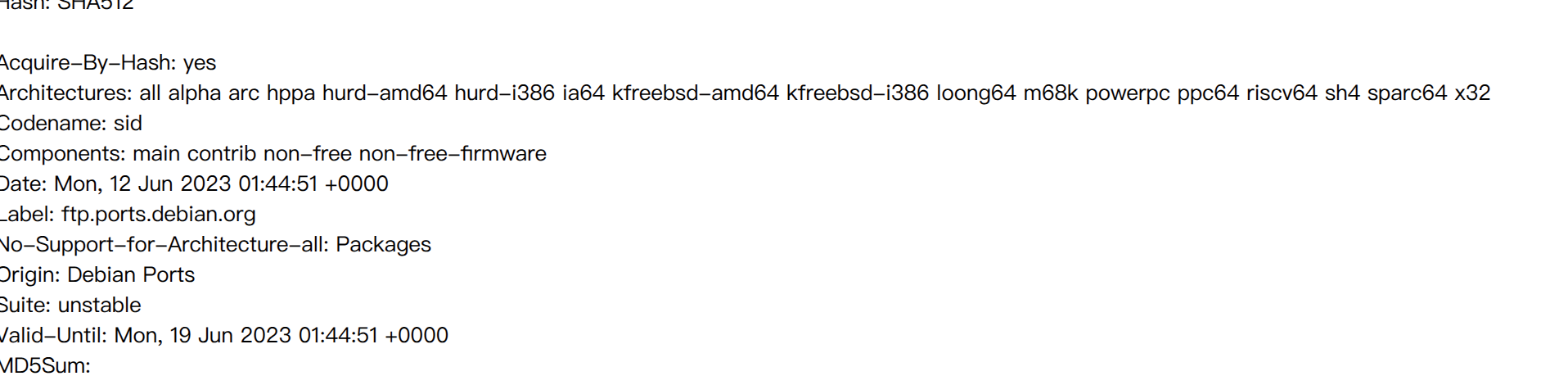
于是按 drop 命令移除现有镜像,并添加新的mirror:
skp1238@Mint-Yilong15Pro:~$ aptly mirror drop 2023-port
Mirror `2023-port` has been removed.
skp1238@Mint-Yilong15Pro:~$ aptly mirror create -architectures="riscv64" 2023-port https://snapshot.debian.org/archive/debian-ports/20230612T050707Z unstable main
Downloading https://snapshot.debian.org/archive/debian-ports/20230612T050707Z/dists/unstable/InRelease...
Following redirect to https://snapshot.debian.org/file/411e6e14940e44b0ee8ba67c020f2fe330a5ca59/InRelease...
Success downloading https://snapshot.debian.org/archive/debian-ports/20230612T050707Z/dists/unstable/InRelease
gpgv: 签名建立于 2023年06月12日 星期一 09时45分22秒 CST
gpgv:                使用 RSA 密钥 D0C987D7BEC3EDDF89486CC2B523E5F3FC4E5F2C
gpgv: 完好的签名,来自于 “Debian Ports Archive Automatic Signing Key (2023) <ftpmaster@ports-master.debian.org>”
gpgv: 签名建立于 2023年06月12日 星期一 09时45分22秒 CST
gpgv:                使用 RSA 密钥 01C2D6F3D1A46AD1C0DC2F3D8D69674688B6CB36
gpgv: 完好的签名,来自于 “Debian Ports Archive Automatic Signing Key (2024) <ftpmaster@ports-master.debian.org>”

Mirror [2023-port]: https://snapshot.debian.org/archive/debian-ports/20230612T050707Z/ unstable successfully added.
You can run 'aptly mirror update 2023-port' to download repository contents.
skp1238@Mint-Yilong15Pro:~$ aptly mirror update 2023-port
Downloading https://snapshot.debian.org/archive/debian-ports/20230612T050707Z/dists/unstable/InRelease...
Following redirect to https://snapshot.debian.org/file/411e6e14940e44b0ee8ba67c020f2fe330a5ca59/InRelease...
Success downloading https://snapshot.debian.org/archive/debian-ports/20230612T050707Z/dists/unstable/InRelease
gpgv: 签名建立于 2023年06月12日 星期一 09时45分22秒 CST
gpgv:                使用 RSA 密钥 D0C987D7BEC3EDDF89486CC2B523E5F3FC4E5F2C
gpgv: 完好的签名,来自于 “Debian Ports Archive Automatic Signing Key (2023) <ftpmaster@ports-master.debian.org>”
gpgv: 签名建立于 2023年06月12日 星期一 09时45分22秒 CST
gpgv:                使用 RSA 密钥 01C2D6F3D1A46AD1C0DC2F3D8D69674688B6CB36
gpgv: 完好的签名,来自于 “Debian Ports Archive Automatic Signing Key (2024) <ftpmaster@ports-master.debian.org>”
Downloading & parsing package files...
Downloading https://snapshot.debian.org/archive/debian-ports/20230612T050707Z/dists/unstable/main/binary-riscv64/Packages.gz...
Following redirect to https://snapshot.debian.org/file/8dc8a3dc6ac6f2ec9f8ba236d7c79f2fb00839ce/e02b39b01bc22c3799dd217697b592d8ac4169cf832357dc0c0b73badc721ea0...
Success downloading https://snapshot.debian.org/archive/debian-ports/20230612T050707Z/dists/unstable/main/binary-riscv64/Packages.gz
Building download queue...
Download queue: 84625 items (160.13 GiB)
改正链接后尝试镜像
可以看到整个快照都太大了,100多个g,考虑放nas上面?
后续研究了一下,160个G无论放哪里都不显示(即使是便宜的S3也要花钱,而NAS上我暂时不想动),因此按apt show 看到的优先级(priority)以及 visionfive2官方的那几个需要安装的包去改了一下:
skp1238@Mint-Yilong15Pro:~$ aptly mirror edit -filter="Priority (required) | Priority (important) | Priority (standard)" -filter-with-deps 2023-port

skp1238@Mint-Yilong15Pro:~$ aptly mirror edit -filter="Priority (required) | Priority (important) | Priority (standard) | Name (libcamera-apps) | Name (libreoffice) | Name (v4l2test) | Name (opencv-data) | Name (gstreamer1.0-clutter-3.0) | Name (nodejs) | Name (chromium) " -filter-with-deps 2023-port

skp1238@Mint-Yilong15Pro:~$ aptly mirror edit -filter="@/home/skp1238/.aptly/visionfive2-filter.txt" -filter-with-deps 2023-port
按照 aptly 对包属性的过滤完成了操作,后续它下载了 index 以后,按 index 进行了包的下载操作
skp1238@Mint-Yilong15Pro:~$ aptly snapshot create visionfive2-2023 from mirror 2023-port

Snapshot visionfive2-2023 successfully created.
You can run 'aptly publish snapshot visionfive2-2023' to publish snapshot as Debian repository.


skp1238@Mint-Yilong15Pro:~$ aptly publish snapshot visionfive2-2023
Loading packages...
Generating metadata files and linking package files...
Finalizing metadata files...
Signing file 'Release' with gpg, please enter your passphrase when prompted:
Clearsigning file 'Release' with gpg, please enter your passphrase when prompted:

Snapshot visionfive2-2023 has been successfully published.
Please setup your webserver to serve directory '/home/skp1238/.aptly/public' with autoindexing.
Now you can add following line to apt sources:
  deb http://your-server/ unstable main
Don't forget to add your GPG key to apt with apt-key.

You can also use `aptly serve` to publish your repositories over HTTP quickly.
把镜像作为快照(时间点)发布,再将快照作为包源发布
skp1238@Mint-Yilong15Pro:~$ aptly serve
Serving published repositories, recommended apt sources list:

# ./unstable (origin: Debian Ports) [riscv64] publishes {main: [visionfive2-2023]: Snapshot from mirror [2023-port]: https://snapshot.debian.org/archive/debian-ports/20230612T050707Z/ unstable}
deb http://Mint-Yilong15Pro:8080/ unstable main

Starting web server at: :8080 (press Ctrl+C to quit)...

(中间开放了防火墙)

skp1238@Mint-Yilong15Pro:~$ ssh user@192.168.31.243
The authenticity of host '192.168.31.243 (192.168.31.243)' can't be established.
ED25519 key fingerprint is SHA256:3rNrnur/1Mmj+BV/xQ4qrvmxFC1F+AxUMLVaJHRvTNE.
This host key is known by the following other names/addresses:
    ~/.ssh/known_hosts:35: [hashed name]
Are you sure you want to continue connecting (yes/no/[fingerprint])? yes
Warning: Permanently added '192.168.31.243' (ED25519) to the list of known hosts.
user@192.168.31.243's password:
Linux starfive 6.12.5-starfive #70SF SMP Sun Sep 28 11:33:07 UTC 2025 riscv64

The programs included with the Debian GNU/Linux system are free software;
the exact distribution terms for each program are described in the
individual files in /usr/share/doc/*/copyright.

Debian GNU/Linux comes with ABSOLUTELY NO WARRANTY, to the extent
permitted by applicable law.
Last login: Tue Feb 28 21:51:00 2023
user@starfive:~$ vi local-debian-mirror.pub
user@starfive:~$ sudo apt-key add local-debian-mirror.pub
[sudo] password for user:
Warning: apt-key is deprecated. Manage keyring files in trusted.gpg.d instead (see apt-key(8)).
OK

user@starfive:~$ sudo apt update
Get:1 http://192.168.31.252:8080 unstable InRelease [3777 B]
Hit:2 https://debianrepo-t.starfivetech.com starfive-debian InRelease
Hit:3 https://debianrepo-t.starfivetech.com/VF2-Lite VisionFive2 InRelease
Get:4 http://192.168.31.252:8080 unstable/main riscv64 Packages [149 kB]
Fetched 153 kB in 4s (37.3 kB/s)
Reading package lists... Done
Building dependency tree... Done
Reading state information... Done
All packages are up to date.
W: http://192.168.31.252:8080/dists/unstable/InRelease: Key is stored in legacy trusted.gpg keyring (/etc/apt/trusted.gpg), see the DEPRECATION section in apt-key(8) for details.
在本地发布仓库以后,在 starfive2 里用 apt-key(没使用新版key管理) 添加仓库,并尝试 update
然后用visionfive2官方的脚本又试了一下,有些依赖没满足,可能是前面的文件没有声明需要依赖?之后再试试:
user@starfive:~$ vi install.sh
user@starfive:~$ sudo bash install.sh
Hit:1 http://192.168.31.252:8080 unstable InRelease
Hit:2 https://debianrepo-t.starfivetech.com starfive-debian InRelease
Hit:3 https://debianrepo-t.starfivetech.com/VF2-Lite VisionFive2 InRelease
Reading package lists... Done
Building dependency tree... Done
Reading state information... Done
All packages are up to date.
W: http://192.168.31.252:8080/dists/unstable/InRelease: Key is stored in legacy trusted.gpg keyring (/etc/apt/trusted.gpg), see the DEPRECATION section in apt-key(8) for details.
Reading package lists... Done
Building dependency tree... Done
Reading state information... Done
Some packages could not be installed. This may mean that you have
requested an impossible situation or if you are using the unstable
distribution that some required packages have not yet been created
or been moved out of Incoming.
The following information may help to resolve the situation:

The following packages have unmet dependencies:
 libcamera-apps : Depends: libboost-program-options1.74.0 (>= 1.74.0+ds1) but it is not installable
 libcamera-doc : Depends: libjs-jquery but it is not installable
                 Depends: libjs-sphinxdoc but it is not installable
                 Depends: libjs-underscore but it is not installable
                 Recommends: libcamera-dev but it is not going to be installed
 libcamera-tools : Depends: libevent-pthreads-2.1-7 (>= 2.1.8-stable) but it is not installable
                   Depends: libyaml-0-2 but it is not installable
 libcamera0.0.5 : Depends: liblttng-ust1 (>= 2.13.0) but it is not installable
                  Depends: libyaml-0-2 but it is not installable
E: Unable to correct problems, you have held broken packages.
Reading package lists... Done
Building dependency tree... Done
Reading state information... Done
Some packages could not be installed. This may mean that you have
requested an impossible situation or if you are using the unstable
distribution that some required packages have not yet been created
or been moved out of Incoming.
The following information may help to resolve the situation:

The following packages have unmet dependencies:
 libreoffice-core : Depends: libzxcvbn0 (>= 0.20150103) but it is not installable
E: Unable to correct problems, you have held broken packages.
Reading package lists... Done
Building dependency tree... Done
Reading state information... Done
v4l2test is already the newest version (1.1-OK3).
The following packages were automatically installed and are no longer required:
  libdouble-conversion3 libmd4c0 libpcre2-16-0 libxcb-xinerama0 libxcb-xinput0
Use 'sudo apt autoremove' to remove them.
0 upgraded, 0 newly installed, 0 to remove and 0 not upgraded.
Reading package lists... Done
Building dependency tree... Done
Reading state information... Done
Some packages could not be installed. This may mean that you have
requested an impossible situation or if you are using the unstable
distribution that some required packages have not yet been created
or been moved out of Incoming.
The following information may help to resolve the situation:

The following packages have unmet dependencies:
 opencv-doc : Depends: libjs-jquery but it is not installable
              Depends: libjs-mathjax but it is not installable
 python3-opencv : Depends: python3-numpy (>= 1:1.22.0) but it is not installable
                  Depends: python3-numpy-abi9 but it is not installable
E: Unable to correct problems, you have held broken packages.
Reading package lists... Done
Building dependency tree... Done
Reading state information... Done
gstreamer1.0-plugins-ugly is already the newest version (1.22.0-2).
gstreamer1.0-plugins-ugly set to manually installed.
gstreamer1.0-plugins-bad is already the newest version (1.22.0-4).
gstreamer1.0-plugins-bad set to manually installed.
Some packages could not be installed. This may mean that you have
requested an impossible situation or if you are using the unstable
distribution that some required packages have not yet been created
or been moved out of Incoming.
The following information may help to resolve the situation:

The following packages have unmet dependencies:
 gstreamer1.0-clutter-3.0 : Depends: libclutter-1.0-0 (>= 1.20.0) but it is not installable
                            Depends: libclutter-gst-3.0-0 (>= 3.0.4) but it is not going to be installed
E: Unable to correct problems, you have held broken packages.
Reading package lists... Done
Building dependency tree... Done
Reading state information... Done
The following packages were automatically installed and are no longer required:
  libdouble-conversion3 libmd4c0 libpcre2-16-0 libxcb-xinerama0 libxcb-xinput0
Use 'sudo apt autoremove' to remove them.
The following additional packages will be installed:
  libc-ares2 libnode108 libuv1 node-acorn node-busboy node-cjs-module-lexer
  node-undici node-xtend
Suggested packages:
  npm
Recommended packages:
  nodejs-doc
The following NEW packages will be installed:
  libc-ares2 libnode108 libuv1 node-acorn node-busboy node-cjs-module-lexer
  node-undici node-xtend nodejs nwjs
0 upgraded, 10 newly installed, 0 to remove and 0 not upgraded.
Need to get 281 MB of archives.
After this operation, 46.6 MB of additional disk space will be used.
Get:1 http://192.168.31.252:8080 unstable/main riscv64 libc-ares2 riscv64 1.18.1-3 [98.1 kB]
Get:2 http://192.168.31.252:8080 unstable/main riscv64 libuv1 riscv64 1.44.2-1 [128 kB]
Get:3 http://192.168.31.252:8080 unstable/main riscv64 node-xtend all 4.0.2-3 [3932 B]
Get:4 http://192.168.31.252:8080 unstable/main riscv64 nodejs riscv64 18.13.0+dfsg1-1 [304 kB]
Get:5 http://192.168.31.252:8080 unstable/main riscv64 node-acorn all 8.8.1+ds+~cs25.17.7-2 [128 kB]
Get:6 http://192.168.31.252:8080 unstable/main riscv64 node-cjs-module-lexer all 1.2.2+dfsg-5 [30.1 kB]
Get:7 http://192.168.31.252:8080 unstable/main riscv64 node-busboy all 1.6.0+~cs2.6.0-2 [16.9 kB]
Get:8 http://192.168.31.252:8080 unstable/main riscv64 node-undici all 5.19.1+dfsg1+~cs20.10.9.5-2 [272 kB]
Get:9 http://192.168.31.252:8080 unstable/main riscv64 libnode108 riscv64 18.13.0+dfsg1-1 [9847 kB]
Get:10 https://debianrepo-t.starfivetech.com starfive-debian/bookworm riscv64 nwjs riscv64 0.65.1 [271 MB]
34% [10 nwjs 47.1 MB/271 MB 17%]                                  5870 kB/s 38s^C